Getting Started
Note
- Ensure to have an HP Tuners account before beginning with the below steps.
- Ensure to have purchased an MPVI device with sufficent credits.
-
Download the latest version of VCM Suite.
-
Connect your MPVI device to your vehicles OBDII port.
-
Connect the USB power cable to the MPVI device and connect the opposite end to your laptop.
-
With the vehicle KOEO (Key on, Engine Off), Open VCM Scanner and click
 >
>  to check for active DTCs. If any are present, resolve issues that could damage your vehicle before tuning. If none, continue.
 -
Open VCM Editor and click the
 icon and click Read.
 -
A Save As window will appear, save the read to your desired location on your laptop as click Save.
Note
- If this is your first read of the vehicle, save it as your default tune. If you get stuck or make too many errors while tuning, you can revert back to it.
-
Select a tab in the top menu bar (e.g., Engine, Trans, Fuel Sys, etc) to modify its parameters.
Note
- Your preferred tuner is your first point of contact for any tune modifications. Reach out to them with any questions.
- Any parameter you modify turns red to show it has been changed.
-
When you are ready to test your new tune modifications, click the
 icon.
icon. -
A Vehicle Writer window will appear, click the drop down arrow and select Write Calibration > Write.
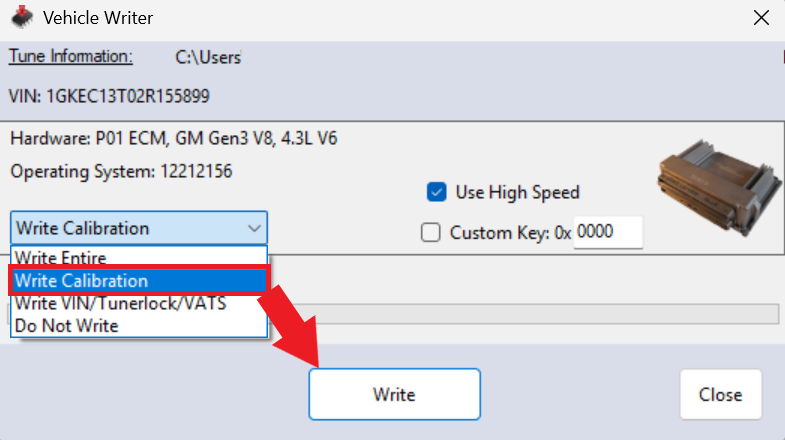
Note
The status light on your MPVI device turns purple while it writes to your vehicle's ECM.
-
The Vehicle Writer window will stat Write completed when the write is completed, click Close.
-
You have successfully tuned your vehicle!