CAM 1x Trigger
CORE ECU supports single-tooth camshafts, which enables support for additional engine platforms, such as the Toyota JZ and Nissan VG. Below outlines how to configure and enable the CORE Cam 1x Trigger feature in VCM Live.
CAM 1x Trigger VCM Live Setup
-
Download the latest version of VCM Live Beta here.
-
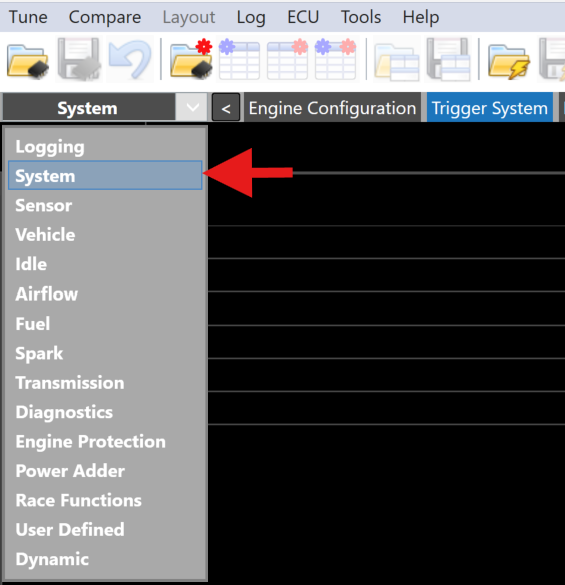
Open VCM Live and click the drop down arrow in the group layout tab and select System.
-
Select Trigger System tab from the system top menu bar.
-
Locate the Reluctor Wheel Type parameter and click the drop down arrow and select CAM_1x_Trigger.
-
Locate the Crank Tooth Count parameter and enter the total amount of teeth on your crank wheel has.
Example
For a 60-2 reluctor wheel you would enter 60.
-
Locate the Crank Missing Tooth Count parameter and enter the total amount of missing teeth on your crank wheel.
Example
For a 60-2 reluctor wheel you would enter 2.
-
Locate the Crank Trigger Edge parameter and change the value to either Falling or Rising, Falling is the default. Ask your tuner whether Rising suits your sync point better.
To determine which value to use for the Crank Trigger Edge parameter, you will need to use the VCM Live trigger scope feature.
a. You will need to connect to core by clicking the
 icon.
icon.b. Once connected, click ECU > Trigger Scope.
c. Click the
 icon to begin recording, click the
  icon once enough data have been collected.
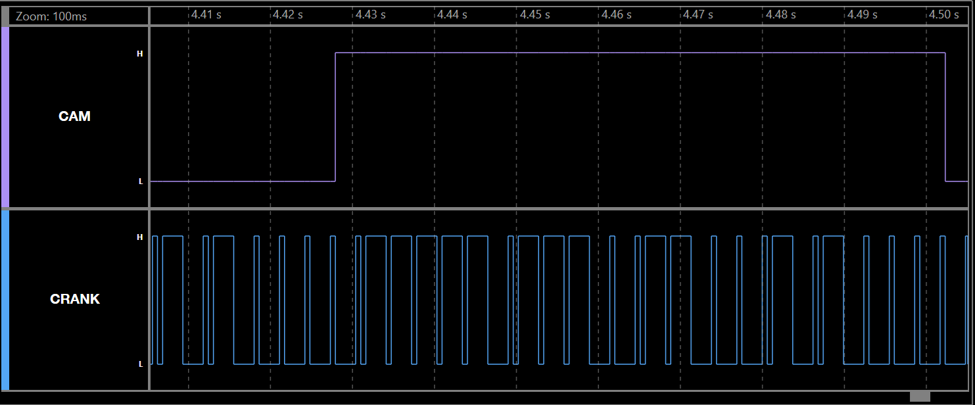
d. Utilize the trigger scope to determine whether you should use Falling or Rising edge for the Crank Trigger Edge. You should use whichever edge has been machined to have even spacing. In the Trigger Scope example above you can see that all of the Falling edges have approximately the same elapsed time between them whereas the Rising edges do not. In this case you should set Crank Edge Trigger to Falling Edge.
Note
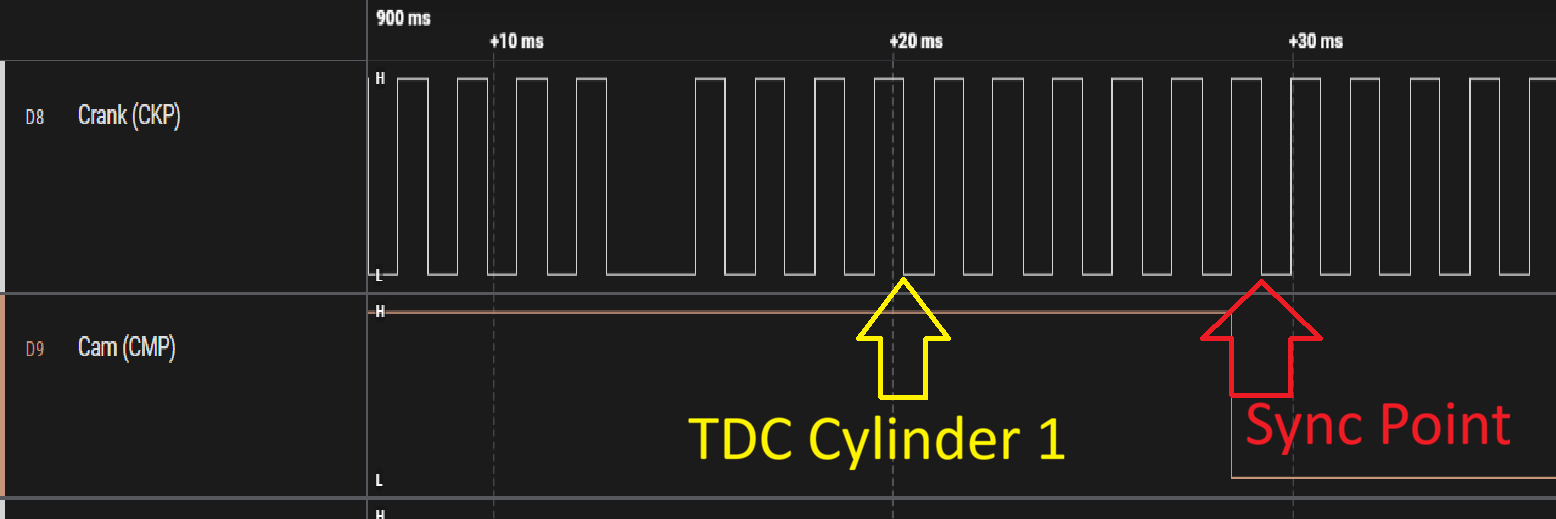
The "Sync point" is the position CORE treats as 0° of the 720° cam period, based on your Crank Edge Trigger and Cam Edge Trigger selections. The “Sync Point” is determined as follows: The sync point for the trigger is on the Crank Edge of your choosing after the Cam Edge of your choosing via Crank Trigger Edge and Cam Trigger Edge respectively. The TDC Offset is the angle between the sync point and the last occurrence of TDC of Cylinder 1.
-
Calculate the TDC Offset, We recommend first roughly calculating the angle between the Sync Point and the last occurrence of TDC of cylinder 1 on the compression stroke. Once this has been determined set your TDC Offset characteristic to this value, and from here use a timing light to fine tune your TDC Offset.
Example
- Crank Edge Trigger used: Falling Edge
- Cam Edge Trigger used: Falling Edge
- Crank Tooth Count: 36
- Crank Missing Tooth Count: 1
- Because of the above settings the “Sync Point” would fall on the Falling Edge of crank (CKP) after the falling edge of cam (CMP) as shown in the picture above.
- TDC of Cylinder 1 on the compression stroke falls 6 teeth before the sync point. With 72 crank teeth evenly spaced over a 720° cam period, each tooth is 10°, so the TDC Offset is 60° (6 teeth × 10°/tooth).
-
Cam 1x Trigger is now ready to be utilized.
Note
Cam 1x Trigger also supports Crank Cam Offset, refer to the Crank Cam Offset section for more information.