Misfire Detection
CORE ECU includes a dedicated misfire detection control feature that allows users to monitor the consecutive misfires required to consider a misfire to be present in any particular cylinder. The following steps outline the process for configuring and enabling Misfire Detection.
-
Download the latest version of VCM Live Beta here.
-
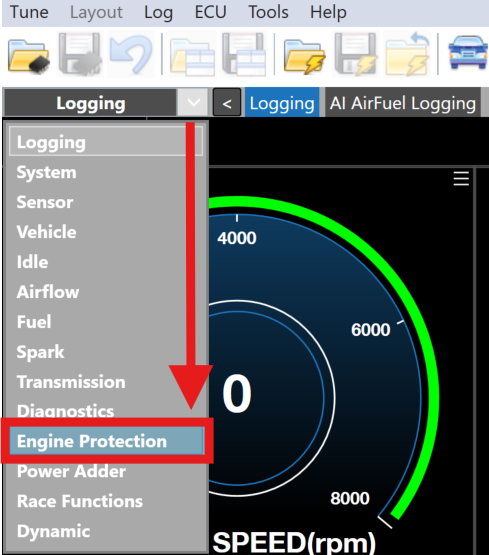
Open VCM Live and click the drop down arrow in the group layout tab and select Engine Protection.
-
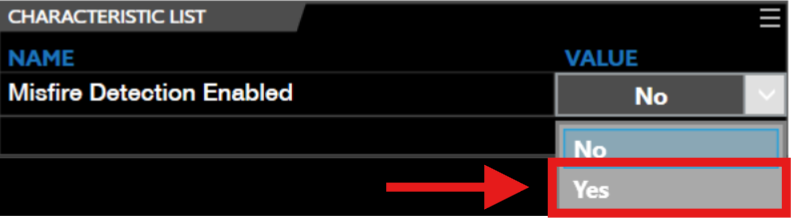
Select the drop down arrow for the Misfire Detection Enabled characteristic parameter and select Yes.
-
Locate the Misfire Detection Enable Minimum Engine Run Time characteristic parameter and set to your desired value.
Note
- The engine must run longer than the value set for this characteristic.
- Ensure engine is under load and not operating in idle.
- Ensure no active fuel injection or ignition cuts are present.
-
Locate the Misfire Detection Activation Delay Cycles characteristic parameter and set to your desired value.
Note
The number of consecutive misfires on a particular cylinder must exceed this parameter to be considered a valid misfire.
-
Locate the Misfire Detection Threshold characteristic parameter and set to your desired value.

This parameter can be used to control the sensitivity in which the misfire is detected.
- a higher value results in lower sensitivity
- a lower value results in higher sensitivity
-
Misfire is now ready to be utilized.