Additional App Enhanced Options🔗
TrackAddict supports a range of plug-in devices to extend datalogging capabilities. The following options are available for configuration.
Note
All of the below options can be found by tapping the 
Storage Location🔗
Choose between Internal, External, or SD Card storage.
Note
External is default. When using External or SD Card storage, your session files will be accessible from file manager and other apps, and via USB, in the Android/data/com.hptuners.trackaddict/files/ directory.
Setup Dashboard Display🔗
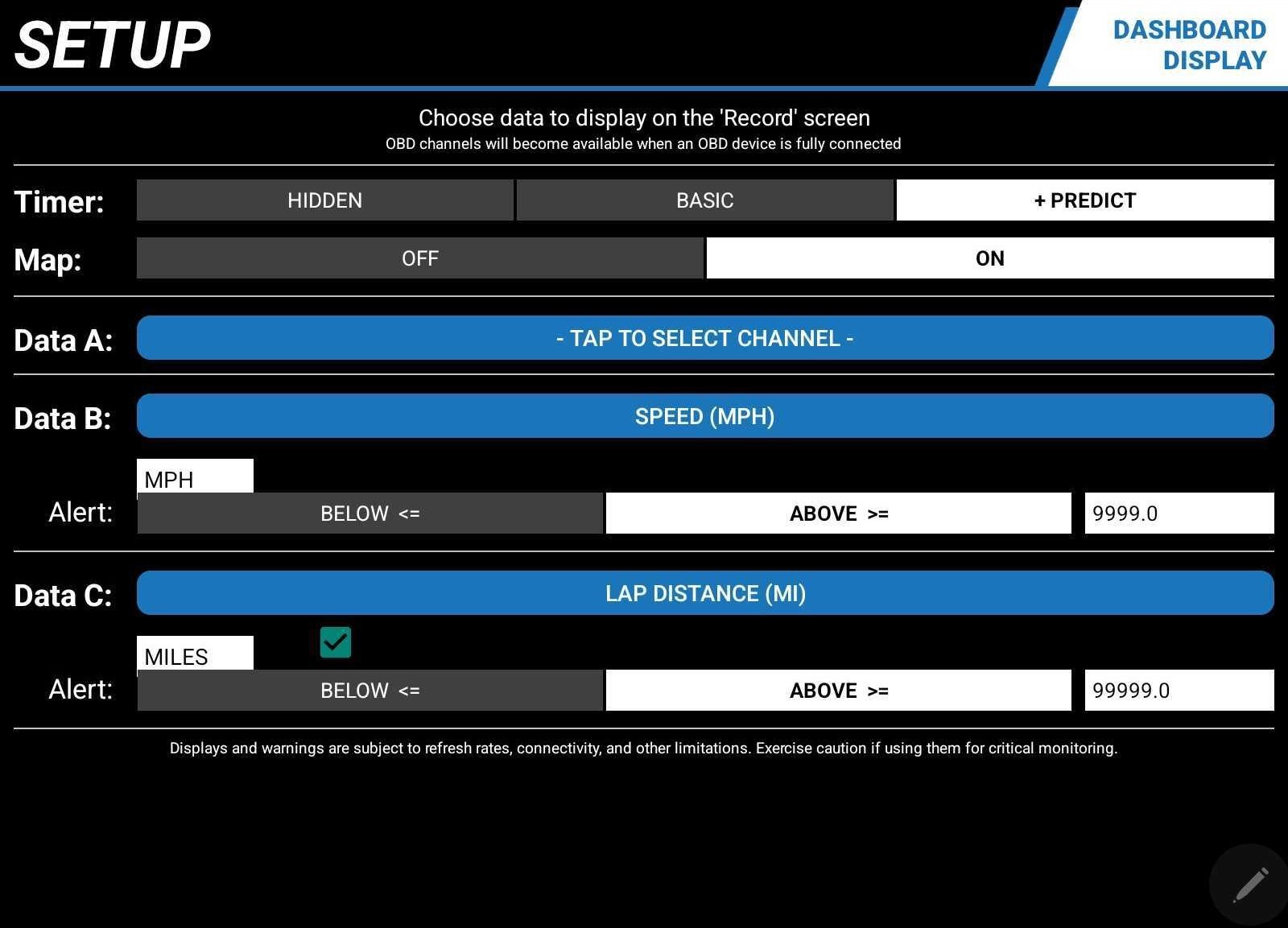
Set lap timer and data channel displays to be shown when recording a session.
Timer🔗
Three timer options are available for the dashboard display:
| Timer Option | Description |
|---|---|
| Hidden | Removes the timer from the display. |
| Basic | Is the default timer display option. |
| + Predict | Displays your best time and shows a live +/- comparison against your current run. |
Map🔗
The map display can be enabled or disabled.
Data A, B, & C🔗
Users can select a data channel to display or disable the feature entirely.
Note
An alert trigger can also be configured for the selected channel.
OBD Device🔗
Additional vehicle data channels can be enabled via a compatible OBD interface device (see table below).
Note
Supports RPM, throttle position, coolant temperature, and select additional sensors, as well as basic fault code scanning and reset.
| OBD Product | Connection | Compatibility & Notes |
|---|---|---|
| HP Tuners MPVI/RTD 4 | Bluetooth | Android & iOS; Enhanced Support |
| Carista | Bluetooth (Android) / BLE (iOS) | Android & iOS |
| GoPoint BT1A | Bluetooth | iOS Only |
| Hondata s300 v3 | Bluetooth (Android) / BLE (iOS) | Android & iOS |
| OBDLink CX BLE | Bluetooth | Android & iOS |
| OBDLink LX Bluetooth | Bluetooth | Android Only |
| OBDLink MX / MX+ Bluetooth | Bluetooth | Android Only |
| OBDLink MX WiFi | WiFi | Android & iOS |
| OBDLink SX USB | USB Cable | Android Only |
| Veepeak OBDCheck BLE | Bluetooth (Android) / BLE (iOS) | Android & iOS |
| ELM327 Compatible or STN11xx Devices | WiFi / Bluetooth / USB | WiFi Devices: Android & iOS |
GPS🔗
Location data can be sourced from the device's built-in GPS (iOS/Android) or via Bluetooth from a compatible enhanced GPS device (see table below for compatible GPS devices).
| GPS Product | Sample Rate | Connection | Compatibility & Notes |
|---|---|---|---|
| Dual XGPS160 | 10 Hz | Bluetooth | iOS & Android — Recommended choice for iOS |
| Dual XGPS150 | 5 Hz* | Bluetooth | iOS & Android — Android defaults to 1 Hz; 5 Hz can be enabled by connecting once via the iOS version of TrackAddict |
| Garmin GLO | iOS: 4 Hz / Android: 10 Hz | Bluetooth | iOS & Android — On iOS, data is reported through the OS framework at approximately 4 Hz |
| Haze GPS_BT | 18 Hz | Bluetooth | Android Only — Recommended choice for Android. External GPS antenna for maximum reception quality |
| Qstarz BT-Q818XT | 10 Hz | Bluetooth | Android Only — Recommended choice for Android. Self-contained GPS antenna for portability |
| Qstarz BT-Q1000eX | 10 Hz | Bluetooth | Android Only — Older product, no longer sold. Use the MTKutility app to enable GGA messages for altitude and accuracy data |
| Other Bluetooth GPS Units | 1–20 Hz | Bluetooth | Android Only — Must provide standard NMEA-0183 sentences (RMC, GGA, GLL) via Bluetooth Serial Port Profile (SPP) |
Use Accelerometer for Start/Stop🔗
Controls whether the accelerometer is used to trigger the timer in Drag Race mode, as well as in Segment and Trail modes when no start line coordinates are defined.
Note
The accelerometer provides greater precision, though certain vehicles or conditions may result in false starts.
Numeric Broadcast Protocol (NBP)🔗
Additional data channels can be enabled via a compatible Numeric Broadcast Protocol device.
| Connection | Compatibility & Notes |
|---|---|
| Classic Bluetooth (SPP) | Android Only |
| WiFi | iOS & Android — User must enter the device's IP address and port number |
| USB Cable (via USB OTG adapter) | Android Only — Experimental/As-Is. Requires Android 6.0 (Marshmallow) or newer with USB OTG support |
Live Online Telemetry🔗
Telemetry data can be streamed publicly or privately during a recorded session via Live.RaceRender.com.
Camera🔗
Certain compatible cameras can be controlled directly within the app. See the table below for supported models.
| Camera | Connection | Notes |
|---|---|---|
| GoPro HERO 4 - 8 | WiFi | Older HERO 4 models may require a firmware update. Not known to work reliably with GoPro 8 or newer. |
| GoPro Session | WiFi | Expected to work but untested. Support provided as-is. |
| GoPro HERO+ LCD | WiFi | |
| GoPro HERO 3 / 3+ | WiFi | |
| GoPro HERO 2 w/ WiFi BacPac | WiFi | Expected to work but untested. Support provided as-is. |
| Garmin VIRB Elite | WiFi | Other WiFi-capable Garmin VIRB models may work but are untested. |
| SJCAM SJ4000 / SJ5000 (WiFi models) | WiFi | Authentic cameras only — clones and knock-offs are not supported. Does not support SJ4000 Air 4K or similar variants. Support is experimental and subject to change pending further testing and user feedback. Other WiFi-capable SJCAM models may work but are untested. |
Note
Video recorded by an external camera remains on the camera itself and is separate from the app's built-in video functionality. This footage does not consume device storage but is also not available for in-app playback or rendering. TrackAddict's built-in video feature can be used simultaneously to capture a second angle via the device's internal camera, which will be available for playback and rendering within the app after the session.