Licensing Vehicles🔗
The VCM Editor is licensed based on the vehicles you are actually tuning (or plan to tune in the future). A license is tied to a vehicle's VIN, as well as the serial number and operating system version of its VCM.
A separate license will be required for each HP Tuners interface device you use to flash vehicles. Vehicles that are not licensed on a particular interface device cannot be flashed by that device.
Note
For some vehicles, you will be offered the option to license the ECM and TCM separately, rather than licensing the whole vehicle.
Licenses for additional vehicles can be purchased at any time.
Purchasing a License🔗
If you do not yet have a license that covers the vehicle you are working on, the software will prompt you to purchase a license when you attempt to flash those changes to the vehicle. See License Activation Rules (Page 17) for more detail on licensing requirements.
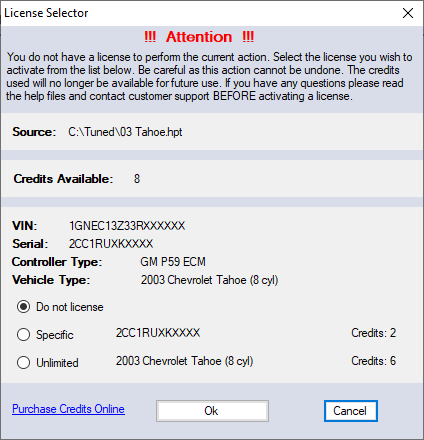
The prompt the software displays looks like this:
Note
Prices for licenses are listed in credits. Credits are the currency HP Tuners uses for license transactions. See Credits (Page 20) for more information.
Choose the desired option and click the Ok button. The appropriate amount of credits will be deducted from the credits on your MPVI2/2+.
How Many Credits Do I Need?🔗
The number of credits required to license a particular vehicle depends on the vehicle. Some vehicles require more credits than others. Most single vehicle licenses require between 2 and 6 credits.
For a list of specific credit requirements by make and model, see the Supported Vehicles page.
Can I Delete Licenses or Swap Them for Another Vehicle?🔗
No. Once licenses are chosen and committed, they are permanently stored and cannot be erased or swapped.
License Activation Rules🔗
You can open, view, and modify any file supported by HP Tuners, whether you have a license for the vehicle or not.
If you do not already have a license that covers the vehicle you are working on, you will be prompted to purchase a license the first time you attempt to write a tune to that vehicle.
Note
Older (pre-MPVI2) devices also required the vehicle to be licensed prior to saving a modified file on your PC. This is not required with MPVI2/2+/3 devices.
The rules are as follows:
- Every HP Tuners interface device must have its own license for each vehicle you flash with that device.
- The vehicle used for the original read your tune is based on must be licensed. This license is tied not only to the vehicle's VIN, but also to the serial number and operating system version of its VCM.
- If you are writing to a different vehicle, you will need a license that covers that vehicle, even if the vehicle is otherwise identical to the vehicle used for the original read. (The new vehicle will still have a different VIN and its VCM will have a different serial number.)
- If you change the VCM installed in the vehicle to be flashed, you will need a license that covers the new VCM. (The new VCM will have a different serial number than the original.)
- If you load a different operating system version on the VCM, you will sometimes be prompted to license the new operating system. However, if you apply a custom operating system from HP Tuners, you will typically not be required to license the custom OS as long as you license the base vehicle BEFORE you attempt to apply the custom OS.
- It's possible to change the VIN for certain vehicles. If you do this, you may be required to license the additional VIN.
Typical Vehicle Licensing🔗
In practice, licensing prompts appear very infrequently. For example:
- When working with your own vehicle, you will almost always read the vehicle first. The read and any modifications you make to the read file do not require a license.
- The first time you write a tune to a particular vehicle, you will be required to purchase the required license(s).
- Once purchased, you have all the licenses needed for your vehicle. This allows you to flash the same vehicle an unlimited number of times without seeing another prompt.
- If you later apply changes to the vehicle that would change the VIN, the PCM or the version of the PCM operating system, you may receive additional licensing prompts.
Take Caution When🔗
The following cases are extreme tests of our licensing rules. To avoid having to purchase multiple licenses for the same vehicle, think carefully before you proceed.
Downloaded Tune Files🔗
Although viewing tune files downloaded from the Internet can sometimes be very helpful when you're learning to tune, flashing these files to a vehicle is NOT recommended.
If you try to write such a file to your vehicle, you will be prompted to purchase a license for the vehicle that file was read from when you attempt to write the file to your vehicle.
If you have not yet licensed your own vehicle, you will be prompted to license your vehicle as well.
Additionally, you may be prompted to license the new VIN/OS combination.
Additional / Replacement VCMs🔗
Single vehicle licenses are tied to both VIN and VCM. If you purchase a spare VCM for your vehicle, you will need an additional license for the spare VCM when you try to write to it.
However, if the spare VCM is the same year and model as a year/model license which you already have, you will not be prompted to license the spare. You will already have a license that supports that VCM.