Training🔗
All Sections within the Training tab are required and must be completed in order to use advanced parameter access.
Courses🔗
The Courses section lists all training required to activate Tuner Tools and unlock advanced parameters. Completing these courses ensures compliance with Clean Air Act regulations enforced by CARB and the EPA.
Parameter Access🔗
The Parameter Access section allows users to create a code to link your access to VCM. The below steps outline how to link your device to VCM Editor.
-
Click on the Parameter Access tab on the left hand navigation menu.
-
Click on the New Device Code.
-
Copy or save the code shown in the pop-up window, then click OK.
-
Open VCM Editor, download the latest version of VCM Editor (if necessary).
-
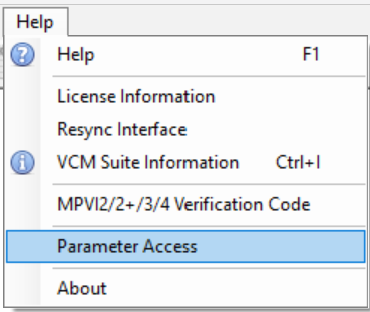
In the top menu bar in VCM Editor click Help > Parameter Access.
-
Type the code within the Device Code tab, write a description if necessary.
-
Click Link This Device.
-
The status bar in the bottom of the parameter access window will turn green when completed.
Note
- Within the Parameter Access tab in Tuner Tools you will see the new linked device under the Linked Devices section.
- You can unlink devices by clicking the
 icon and clicking Yes, unlink it.